
AtlasTx01 / 10
Pillar · the Triage COO
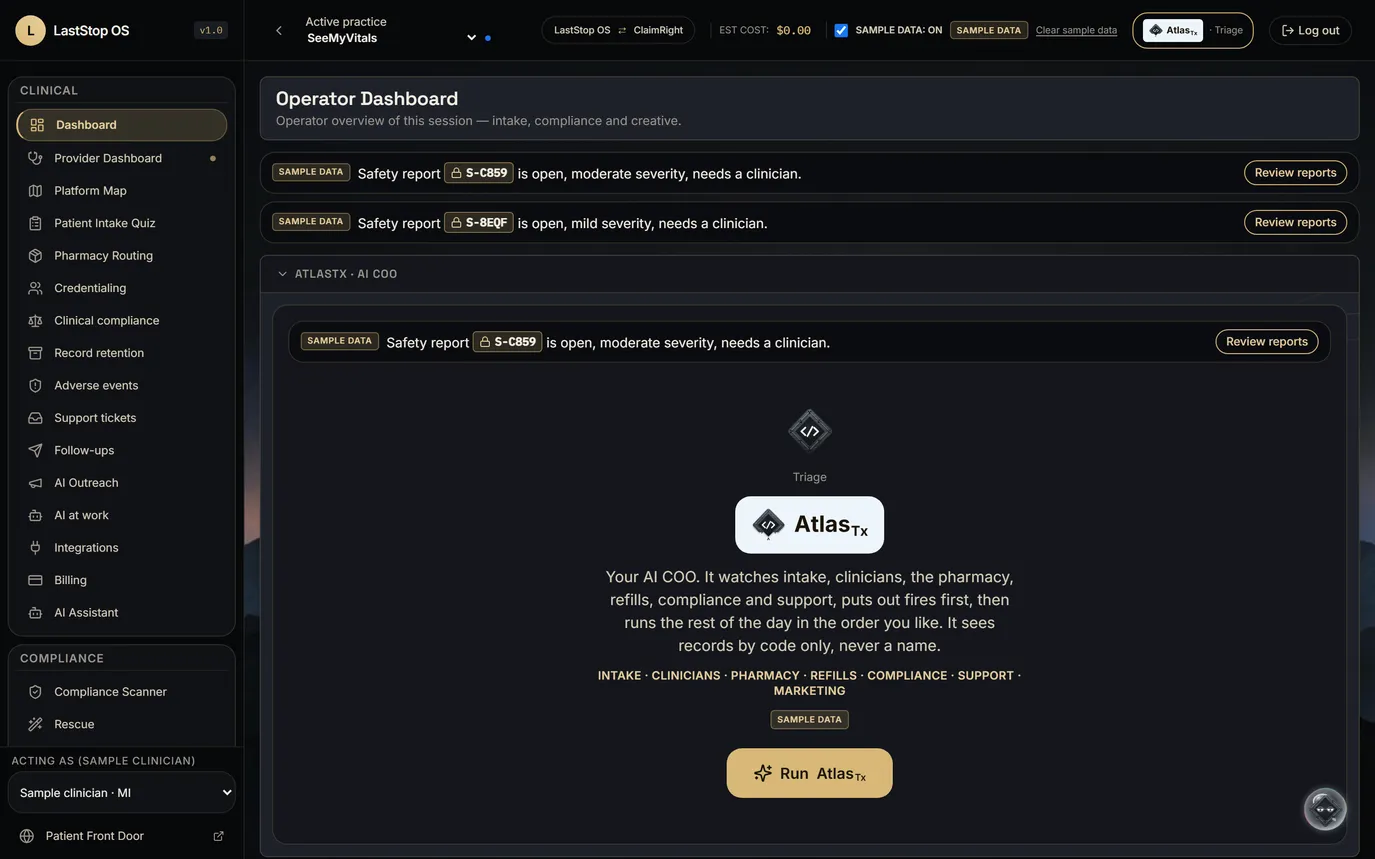
AtlasTx, your Triage COO
It watches the whole business, ranks what's open, and waits for your approval.
- AtlasTx is the AI COO inside LastStop. It collects every open item across the business into one ranked list, fires first.
- It lives on every page as an orb you can drag, or open with Ctrl/Cmd+K.
- One Atlas hint line sits in seven panels: Dashboard, Ad Studio, Brand Absorber, Support, Follow-ups, Compliance and AtlasTx.
- It works on record codes, never names (Blind Atlas).
- Anything that sends, spends, publishes or changes a record waits for a person, and every action goes to the audit log.
- Today it runs on labelled SAMPLE rows in most panels. Real store and practice data is the next step.
On every pageRanks every open itemA person decides
AtlasTx, your Triage COO · LastStop OS · sample data01 / 10
AtlasTx02 / 10
02AtlasTx
The run
CollectIngestRank
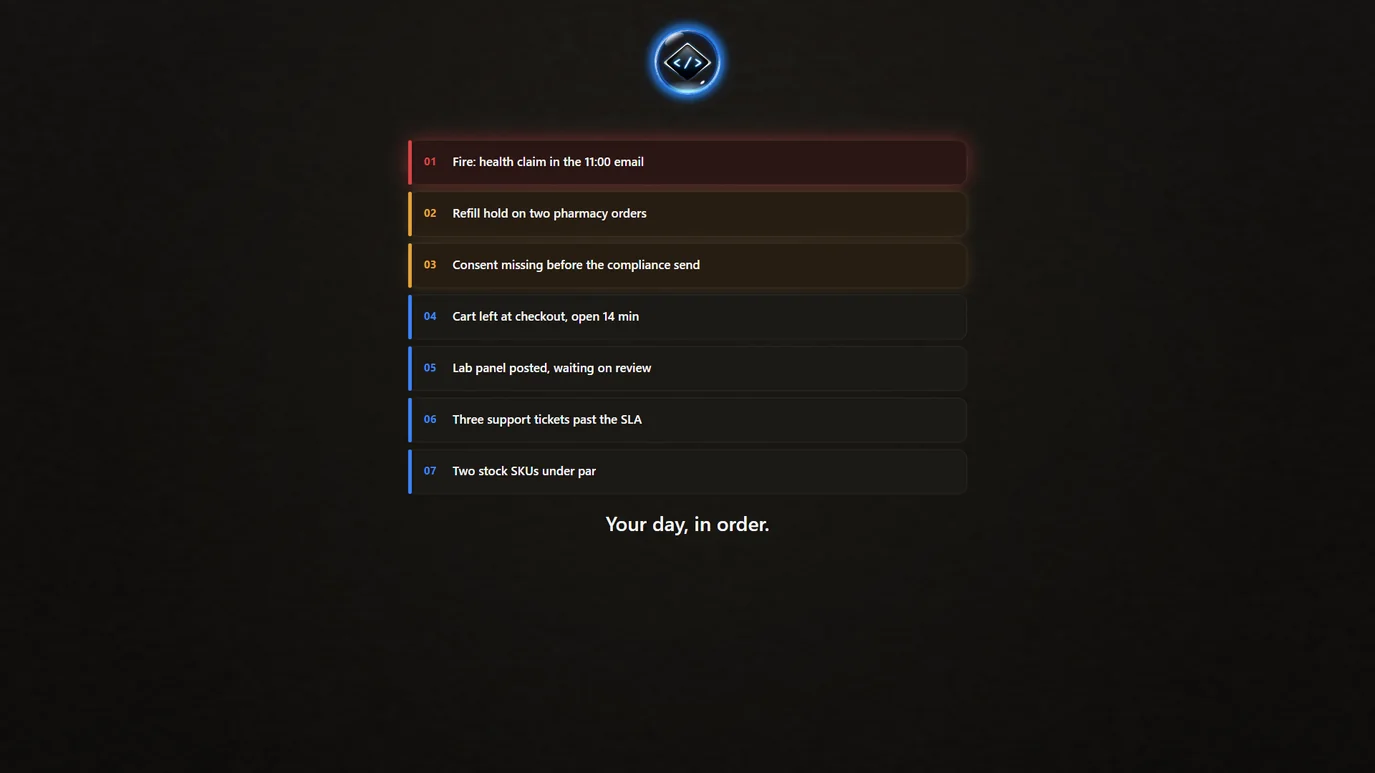
- Collect: open items stream in from orders, carts, support, the pharmacy, compliance, payments, messages and refills, and fill a grid.
- Ingest: everything swirls in, a fast list of record codes scrolls past, no names.
- Rank: cards come out one by one in priority order, the fire first in red, then the rest.
- This is an illustration drawn in code, not a screen recording. The item count in it is illustrative; in the product, the run is one button.
Press Run. It pulls everything in, then pops your day out in order.
AtlasTx, your Triage COO · LastStop OS · sample data02 / 10
AtlasTx03 / 10
03AtlasTx
The ranked day
Fire card on topFive sort orders"Where a person decides"
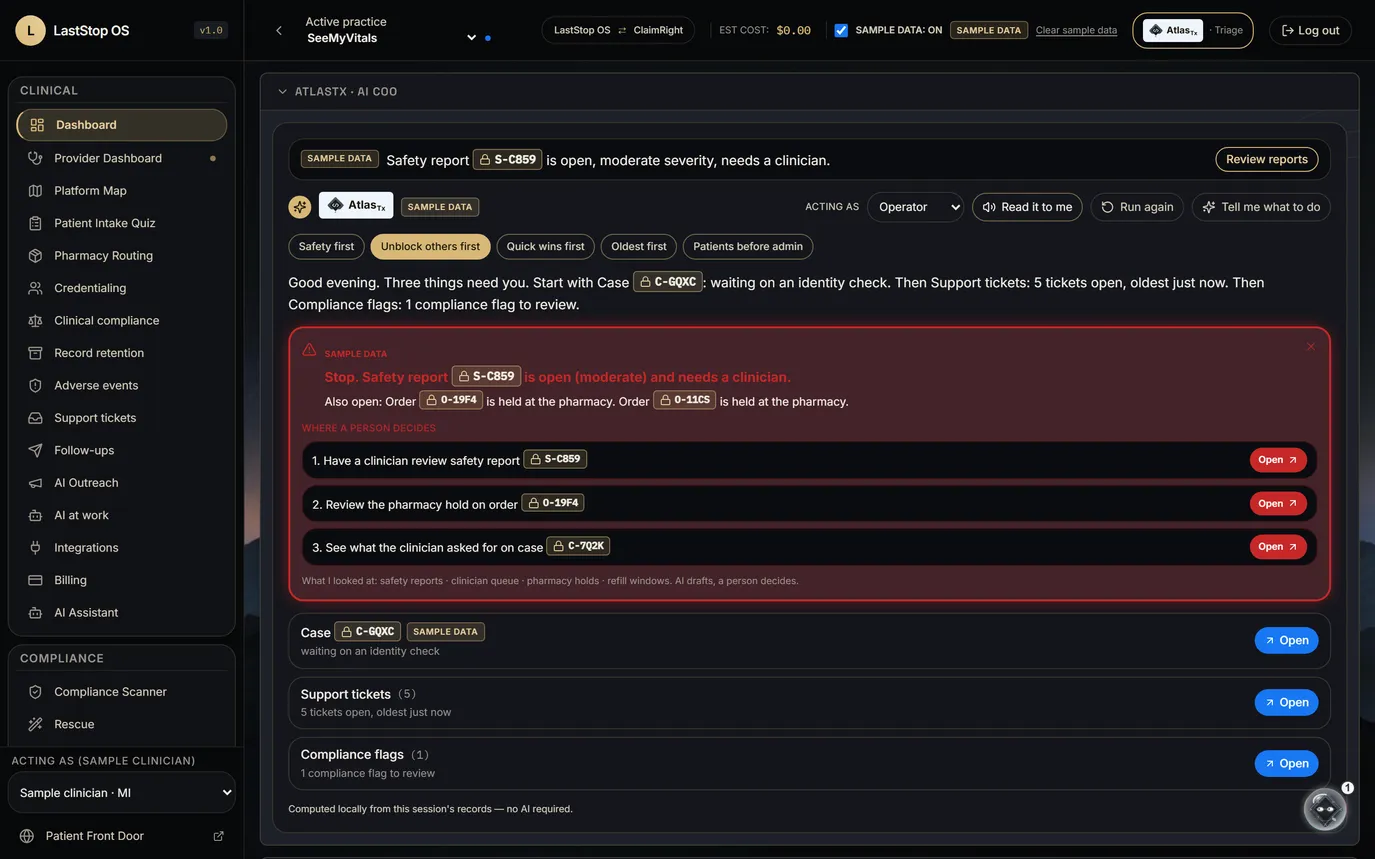
- A one-sentence plan, the fire card, then the ranked queue.
- Five sort orders: Safety first, Unblock others first, Quick wins first, Oldest first, Patients before admin.
- Each item opens under "Where a person decides"; clinical items go to a clinician.
- AtlasTx ranks every open item in the app from the session's records.
- On request, "Tell me what to do" asks the AI for a run order and its reasons.
Fires first. Then the day, in the order you choose.
AtlasTx, your Triage COO · LastStop OS · sample data03 / 10
AtlasTx04 / 10
04AtlasTx
The command bar
Actions for this page"Go to …"Questions answered from the page
- Opens from any page with Ctrl+K (Cmd+K on a Mac).
- Three kinds of entry: actions for the page you're on, "go to …" navigation, and questions.
- The bar answers from the page's own data.
- Anything that drafts or changes something shows "AI drafts, a person decides" with an Approve button.
Ctrl+K from anywhere: do the next thing, go somewhere, or ask.
AtlasTx, your Triage COO · LastStop OS · sample data04 / 10
AtlasTx05 / 10
05AtlasTx
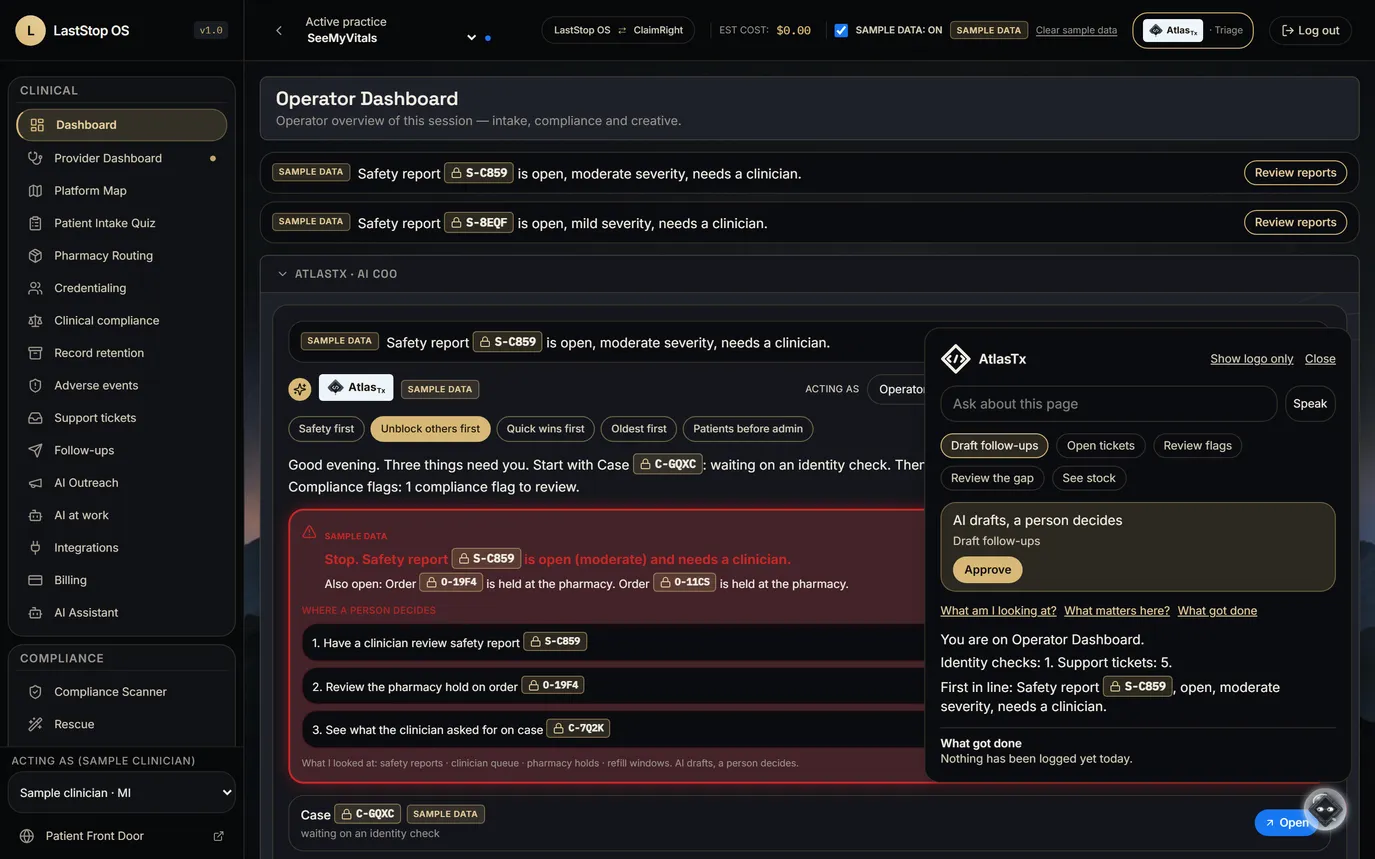
"What am I looking at?"
"What am I looking at?""What matters here?""What got done"
- "What am I looking at?" explains the current page from its own data, for example "Identity checks: 1. Support tickets: 5."
- "What matters here?" picks out the items on this page that need a person.
- "What got done" lists each action approved in the session.
- No numbers are made up: every count comes from the records on the page.
Ask about the screen in front of you. The answer comes from the screen.
AtlasTx, your Triage COO · LastStop OS · sample data05 / 10
AtlasTx06 / 10
06AtlasTx
The daily brief
Once a dayTop five, by record code"Continue" walks the list
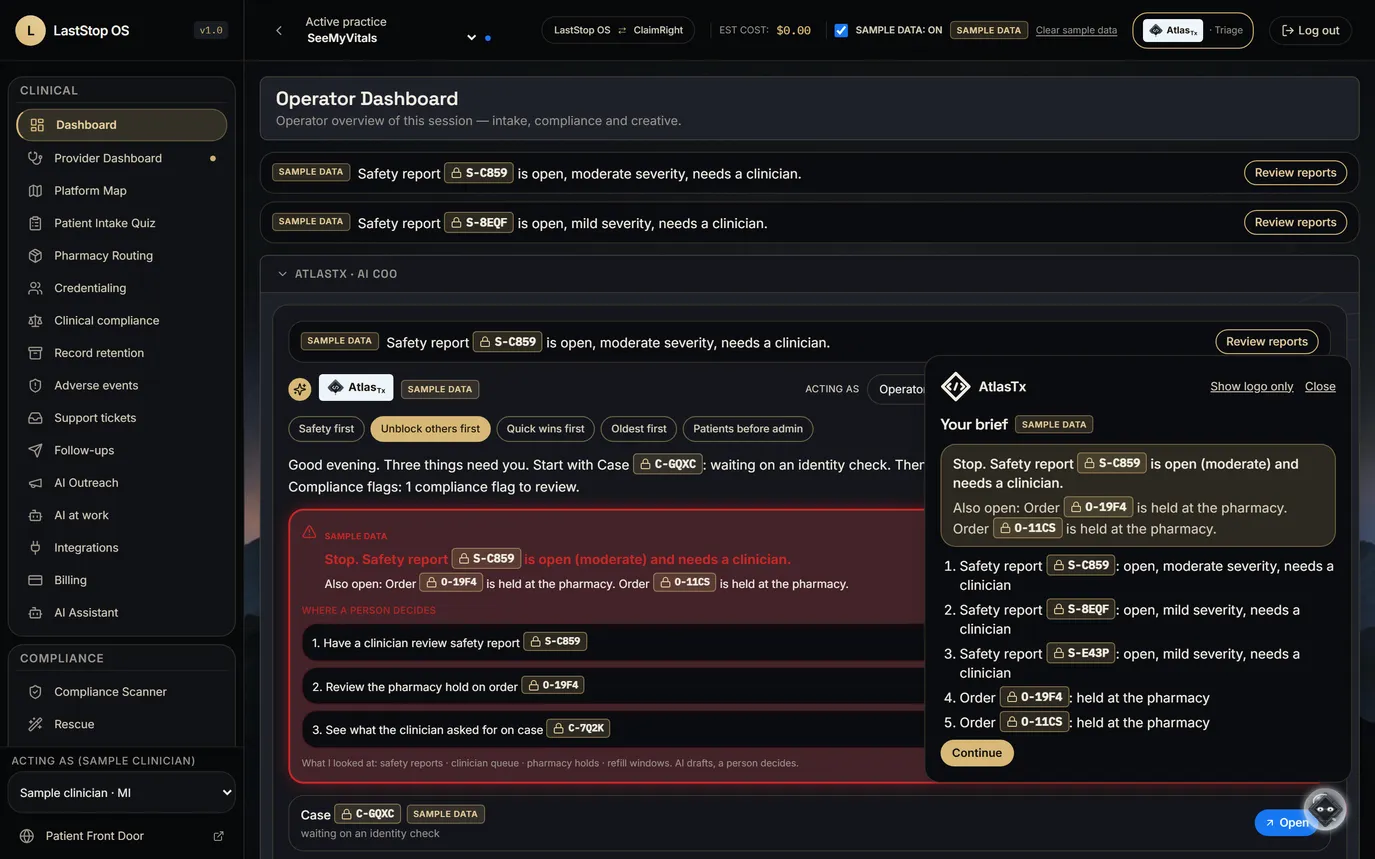
- The brief opens once a day, or on Ctrl+K: the fire card and the five top items, all by record code.
- It is built from the same ranked queue as the run.
- "Continue" walks through the items in order.
Once a day: the fire card and the five items that matter most.
AtlasTx, your Triage COO · LastStop OS · sample data06 / 10
AtlasTx07 / 10
07AtlasTx
Approvals
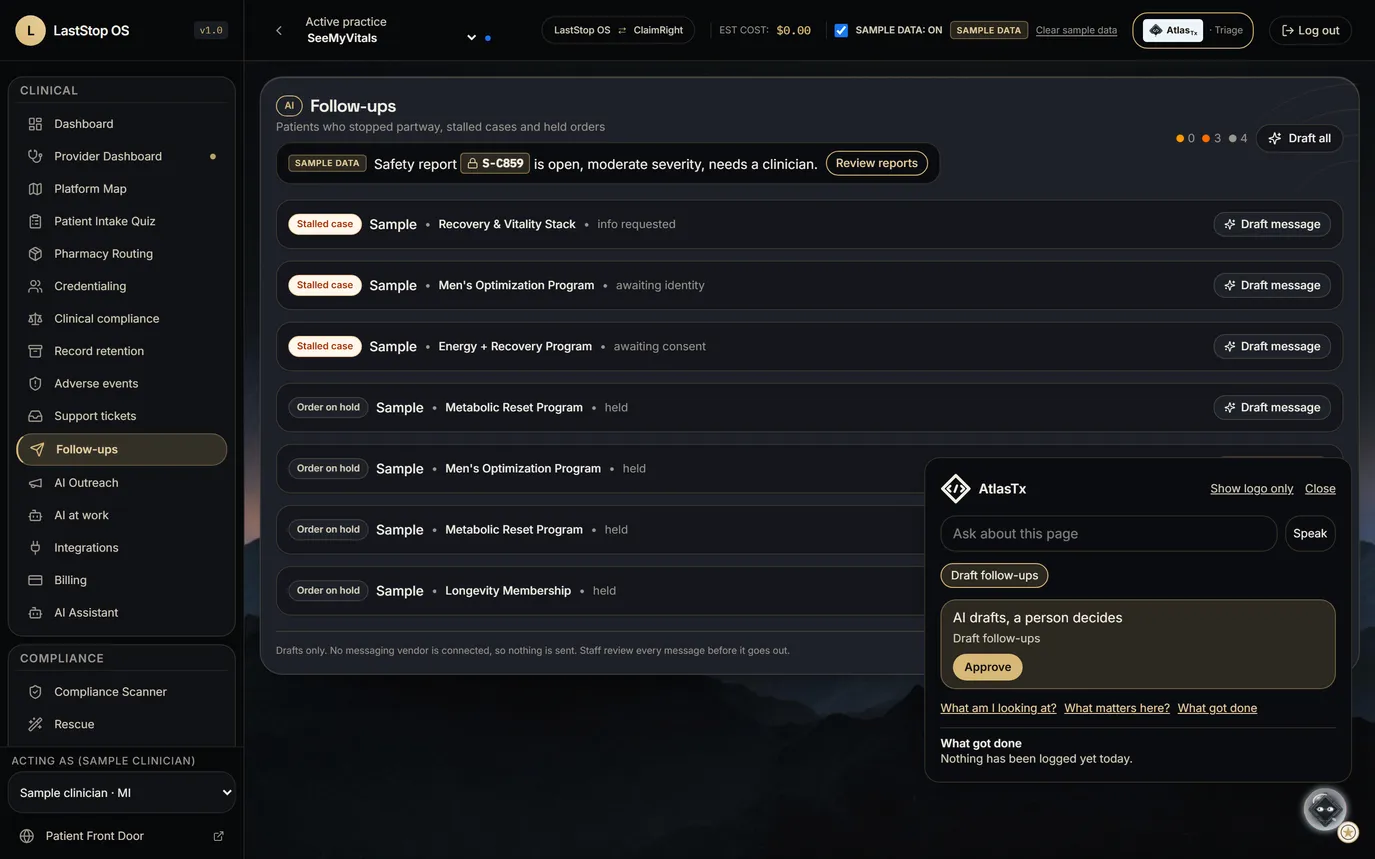
One Approve buttonNothing sends on its ownEvery action logged
- When Atlas offers to do something (draft the follow-ups, rewrite a flagged claim), the card reads "AI drafts, a person decides" with one Approve button.
- After approval the drafts appear for review. Nothing is sent, spent, published or changed without a person.
- Each approved action is listed under "What got done" and written to the audit log.
AI drafts. A person decides. Every time.
AtlasTx, your Triage COO · LastStop OS · sample data07 / 10
AtlasTx08 / 10
08AtlasTx
Blind Atlas
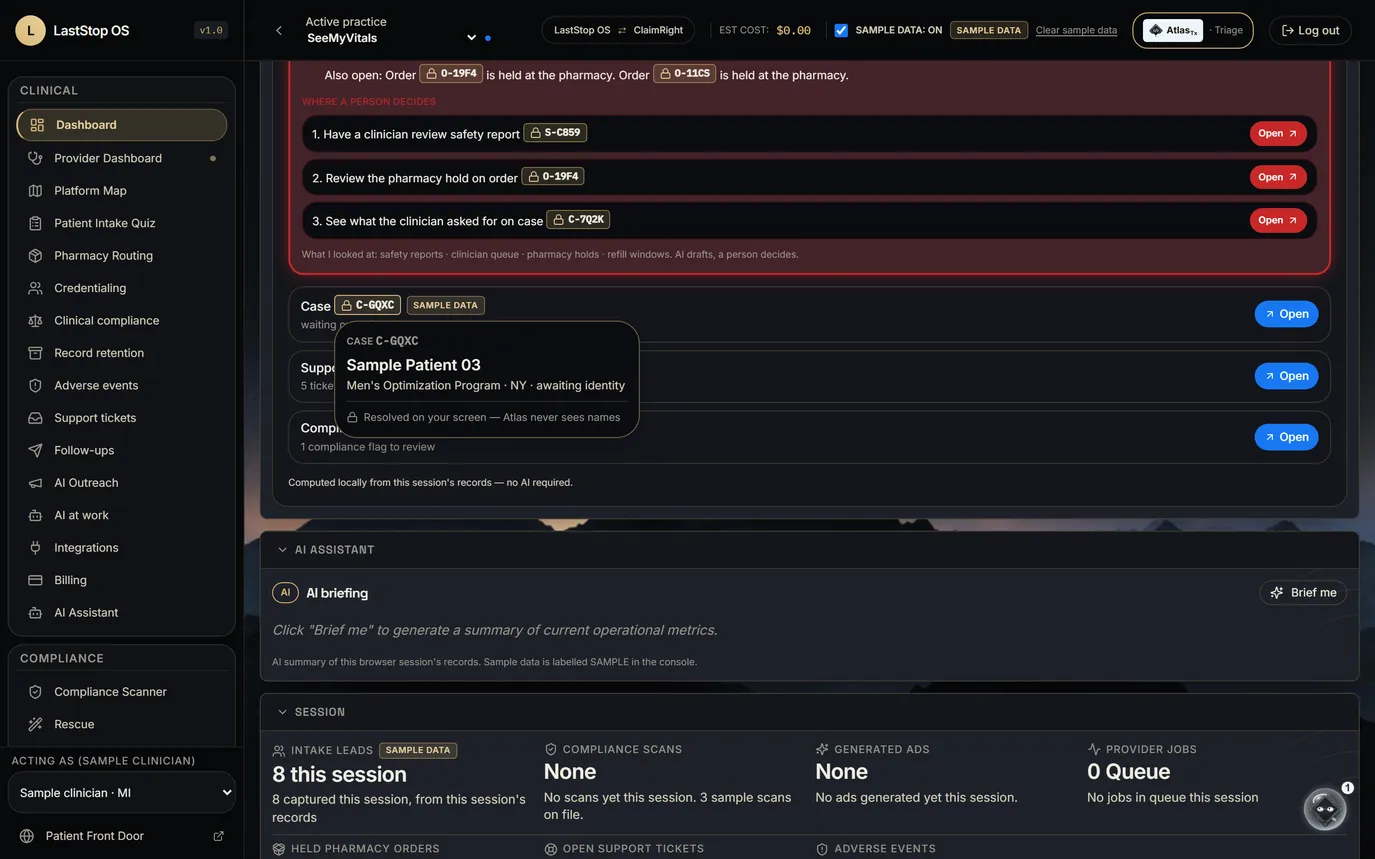
Atlas sees codesThe platform holds the keyYour screen shows the name
- Atlas sees random record codes, status codes, queue names, counts and elapsed time. No names, dates of birth, contact details or free text.
- The platform (the HIPAA side, under BAAs) holds everything, including the code-to-person key.
- Your screen: the code turns into the person only when an authorized user opens it. The platform draws the name, never Atlas.
- HIPAA basis: random re-identification codes (45 CFR 164.514(c)), Safe Harbor identifiers removed (164.514(b)(2)), relative times instead of dates, no free text.
- A guard stops any identifier field from reaching Atlas; 16 automated tests cover it. Privacy counsel review is pending.
- On a research-use store there is no patient data, and the same design applies anyway.
The AI that runs the day never sees who the patients are.
AtlasTx, your Triage COO · LastStop OS · sample data08 / 10
AtlasTx09 / 10

Idlewaiting for the day
- IdleWaiting for the day.
- ThinkingCollecting and ranking.
- FiresSafety reports first.
- DraftingWriting the next step.
- Waiting on youNeeds an approval.
- DoneApproved and logged.
09AtlasTx
The Character
Glass Bubble, Glowing DiamondSix States, One GlanceRed Is for Fires Only
- The mark is a round glass bubble with a glowing </> diamond inside. It is the same bubble that floats at the bottom right of every page.
- Idle: a slow breath of light while Atlas waits for the day. Thinking: a ring of light circles the glass while it collects and ranks every open item.
- Fires: the glass turns red and a ring pings outward, for a safety report, a held order or a blocked claim. Red is used for this one state only.
- Drafting: the diamond flickers while Atlas writes the next step. Waiting on you: a steady bright glow until a person approves or edits it. Done: a calm green glow once it is approved and logged.
A Glass Bubble That Shows What Atlas Is Doing.
AtlasTx, your Triage COO · LastStop OS · sample data09 / 10
AtlasTx10 / 10
10Where it stands
Where it's going
Next: real dataThen: finish the jobLater: SDK, HQ, desktop
- Next: Atlas reads real orders, carts, tickets, compliance flags, stock, COAs and payments. SAMPLE shows only where there's no data yet, and stays labelled.
- Then: each fire gets a path that ends at one approve click, such as drafting the five cart follow-ups, rewriting a flagged claim with a before-and-after, making the ad in the store's locked Season, requesting a missing COA or retrying a held payment.
- After that: watchlists ("tell me when stock drops under 20"), a morning brief and end-of-day recap, Atlas-led onboarding, and push-to-talk voice.
- The goal for a business owner: run the morning from Atlas alone in under 10 minutes. It is a goal, not a measured result.
- Later: an SDK for other apps, Atlas HQ and a desktop companion. They are parked until Atlas is excellent inside LastStop.
First the hallmark of LastStop. Then everywhere else.
AtlasTx, your Triage COO · LastStop OS · sample data10 / 10